Your phone. One conversation.

Run the Aster agent on your Android. Send a message through Telegram, and let it work through your apps for you.

Android 8.0 and up, arm64 devices. Free and open source.

Telegram, example conversation
OpenAIAnthropicGeminiDeepSeekOllama 40 providers ↗

Memory and skills

An agent that picks up where you left off. Keep useful context, return to past conversations, and turn a completed task into a reusable skill.

/remember I prefer a quiet phone after 10 pm10:02 PM ✓✓
Saved to memory Prefers a quiet phone after 10 pm.10:02 PM
/learn10:04 PM ✓✓
New skill: quiet-mode Opens Settings, turns on Do Not Disturb, and lowers ring volume. Run it with /skills.10:04 PM

Android control

Your apps. A new way to use them. The agent reads the screen, taps, swipes, and types. Just say what you want to do.

It comes back on its own

Set it and it checks in. The agent schedules its own wake-ups, ends the turn, and returns when the timer fires. Rider checks, chunked recordings, anything that needs a later look.

Schedule the next rider check in 8 minutes you will be woken in 480s with: Check the KFC order: open Glovo tracking, expand the card, and look for the courier chat…1:19 PM
⏰ Check the KFC order: Benjamin should have picked up by now1:27 PM
Gate code sent. Okponya picked up and is riding now. ETA moved up to 13:40. Next check in 6 minutes.1:27 PM
⏰ Recording chunk handoff: open Recorder, tap the stop button, verify a new .wav appeared…1:38 PM
📎 chunk1.wav1:38 PM

It gets better at your phone

Every task teaches it something. After a run it scores its own rounds, keeps the shortest path, and saves it as a skill. The next time is faster.

📚 check-glovo-order · 18 rounds · best is 6 · lesson noted1:20 PM
📚 record-audio-send · 18 rounds, 19 calls · new skill1:39 PM
/skills1:41 PM ✓✓
Skills /check-glovo-order track a Glovo order, expand the card, message the rider /record-audio-send record in chunks and send each file /quiet-mode DND on, ring volume down Installed skills show up as /commands too.1:41 PM
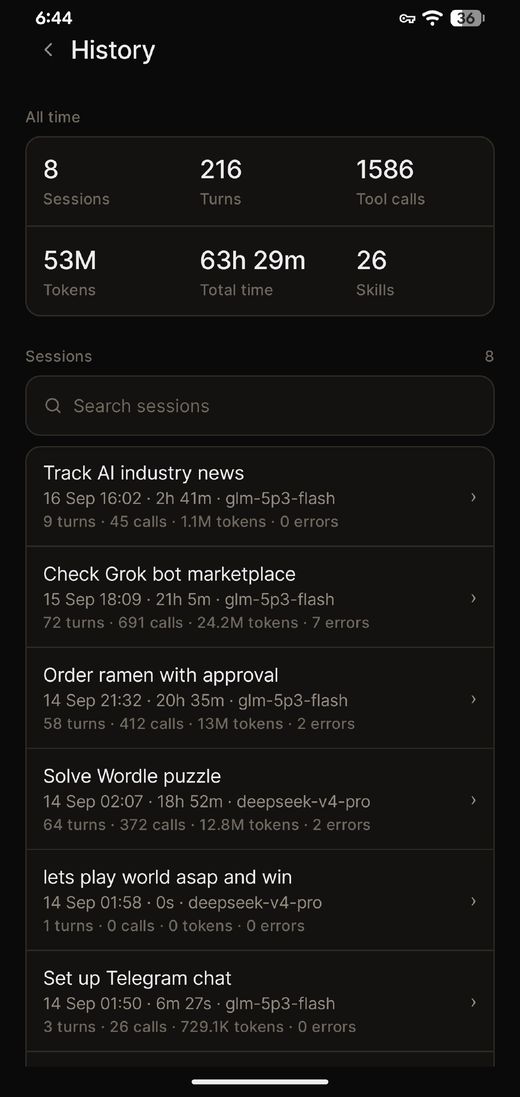
The asterdroid History screen: 8 sessions, 216 turns, 1,586 tool calls, 53M tokens, 63h 29m, 26 skills, with a list of past sessions
A CLOSER LOOK

See the steps behind the task.

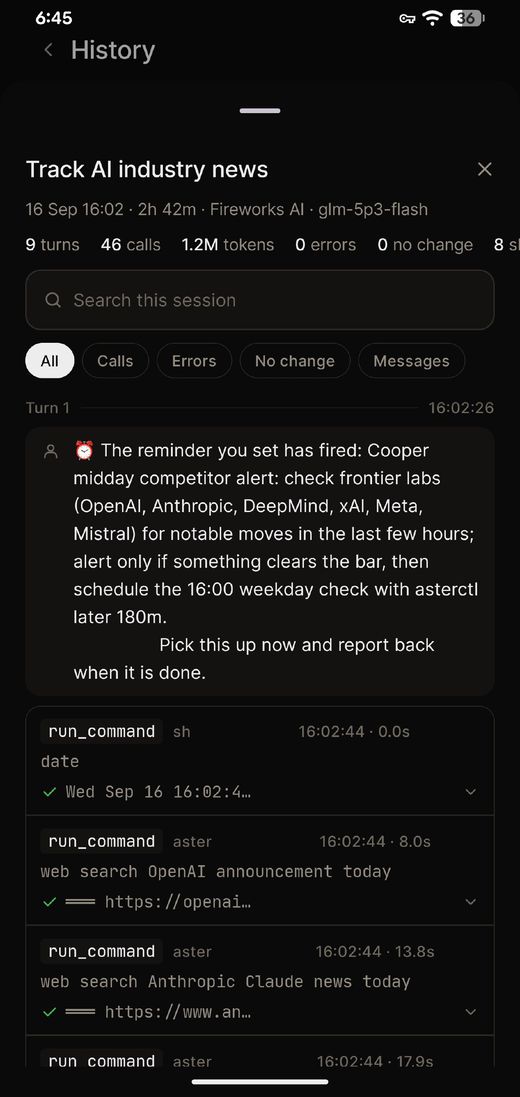
Inspect tool activity, transcripts, and action receipts.

Read the current screenFind the controls available on the device
01
Perform the actionTap, swipe, type, or open an app
02
Observe what changedCheck the updated screen before continuing
03
8sessions
216turns
1,586tool calls
53Mtokens
63h 29mtotal time
26skills

All time, from one phone.

Read about action receipts ↗
A session in the asterdroid History screen: Track AI industry news, 9 turns, 46 calls, 1.2M tokens, with each run_command and its timing

Screen mirror

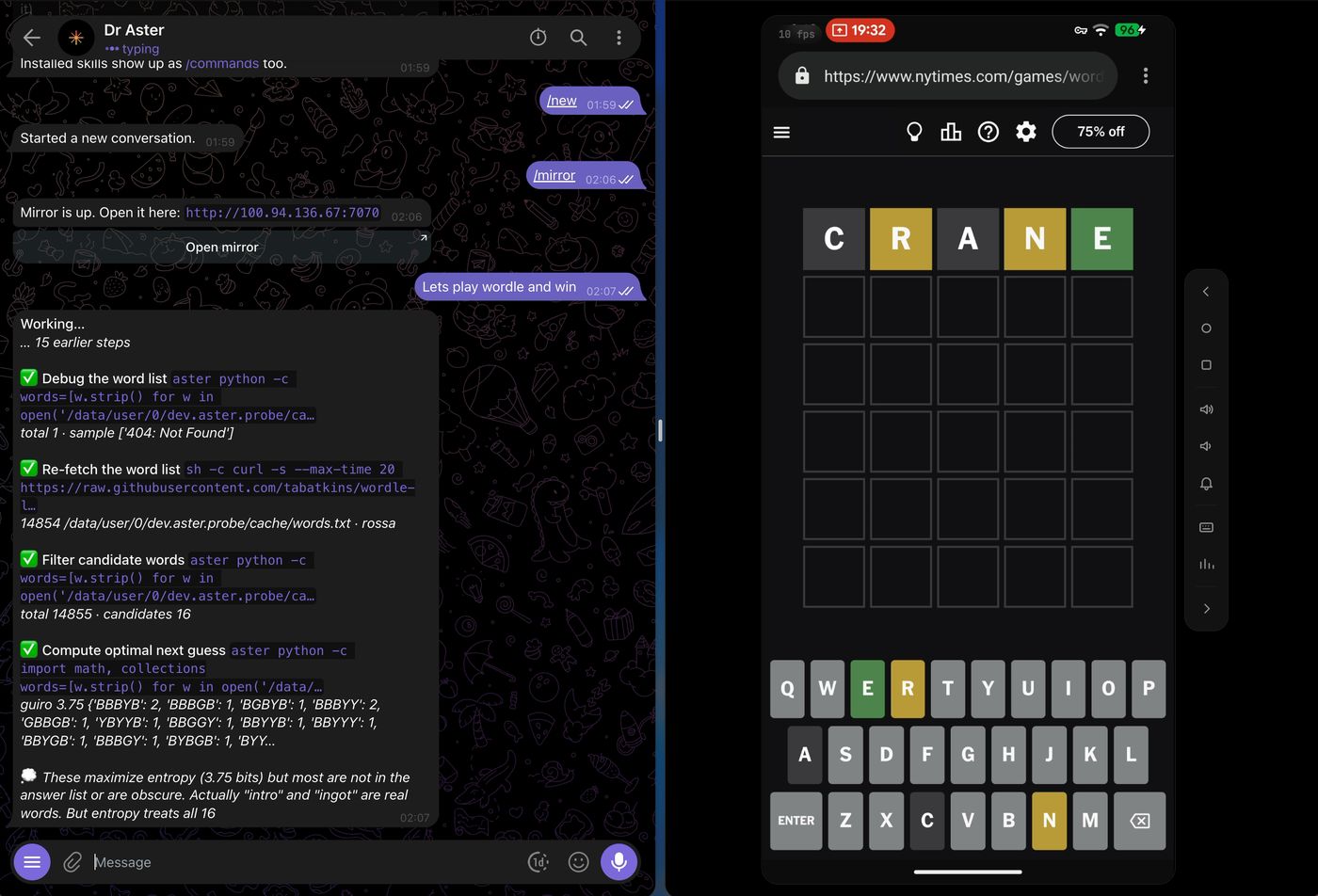
Watch it work. Take over whenever. Open your phone’s live screen in a browser. Tap, type, and control it yourself.

web.telegram.org  ·  100.94.136.67:7070
Real asterdroid session side by side: the Telegram chat with Dr Aster working through a Wordle plan on the left, and the live phone mirror in a browser on the right

Your choice of model

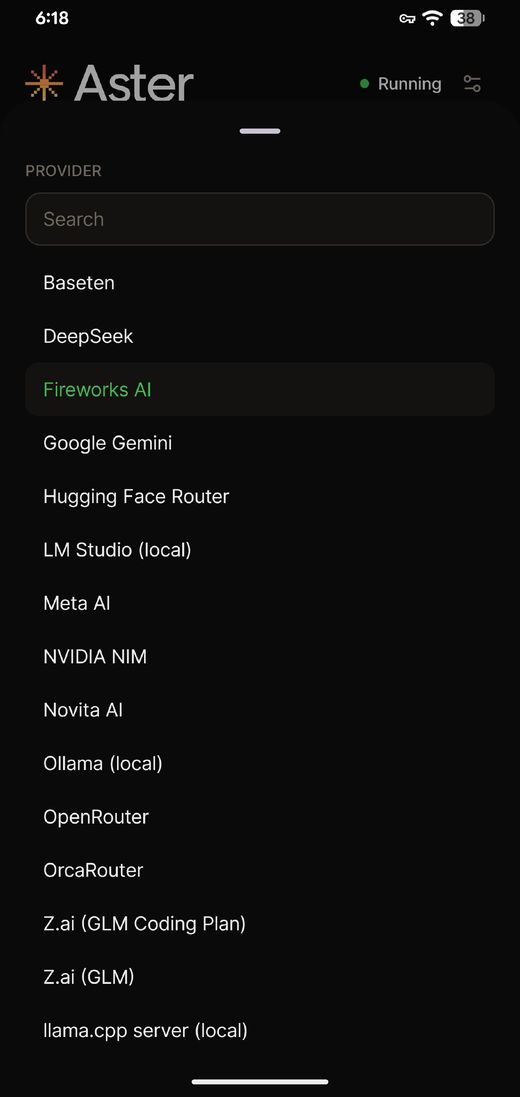
Choose the intelligence behind it. Connect a cloud provider or a local model server. Change the model and reasoning effort from chat.

The asterdroid provider picker: Baseten, DeepSeek, Fireworks AI selected, Google Gemini, Hugging Face Router, LM Studio, Meta AI, NVIDIA NIM, Novita AI, Ollama, OpenRouter, OrcaRouter, Z.ai, llama.cpp
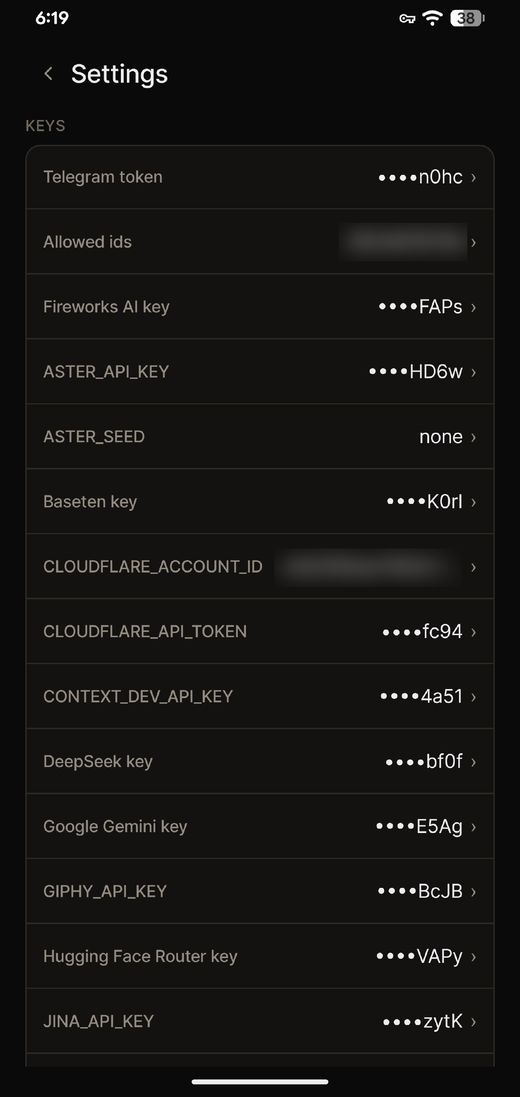
The asterdroid Settings screen listing keys: Telegram token, Fireworks AI, Baseten, Cloudflare, DeepSeek, Google Gemini, Hugging Face Router, Jina, all masked

The everyday details

The little things. Thought through. For the follow-ups, the next task, and everything that happens after hello.

Work on a schedule

Manage check-ins and scheduled runs from Telegram with /checkins and /cron.

Pick up a conversation

List past sessions, resume your work, or start fresh when you need a clean slate.

Remember what matters

Save a fact with /remember and keep useful context across conversations.

Teach it a skill

Use /learn to create a skill from the last turn, then browse the collection with /skills.

Stop or try again

Cancel a running turn, retry the last message, or see what is waiting in the queue.

See what happened

Inspect agent status, tool activity, and transcripts directly in the Android app.

Change the model

Adjust your provider, model, or reasoning effort to suit the work you have in mind.

Keep a window open

Use /mirror to watch and control your phone over your LAN or Tailscale.

Choose who can ask

Set Allowed ids to your Telegram user ID. The bot ignores accounts outside that list.

Getting started

A real agent. On your own Android. Install the app, connect your Telegram bot, and give your phone its first task.

asterdroid / quick startFull guide ↗
  1. Install the latest APK.

    Download from GitHub Releases and grant the requested permissions.

  2. Create your Telegram bot.

    Use @BotFather, then paste its token into asterdroid’s settings.

  3. Choose a model provider.

    Add your API key, or connect a local server. Save and start the agent.

  4. Allow your Telegram account.

    Send “hello” to your bot. Paste the returned numeric user ID into Allowed ids.

Open settings and turn on Do Not Disturb.
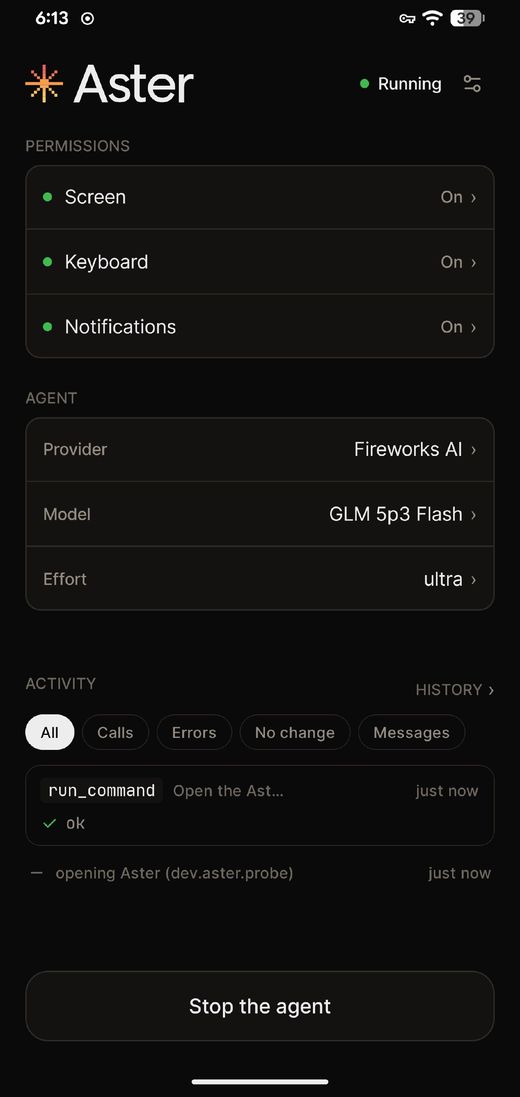
The asterdroid app home screen: permissions on, agent provider and model, live activity, and a Stop the agent button

Still experimental. Runs on Android 8.0 and up on arm64 devices and needs broad device permissions. Cloud models receive the context sent to them. The agent starts in a mode that announces external actions and proceeds; use /mode to change it.

A little more done.
A little less tapping.

Download app

Android 8.0 and up, arm64 devices.